FEAR Launcher 2.2
This program is still under active development. Please report issues and share feeback.
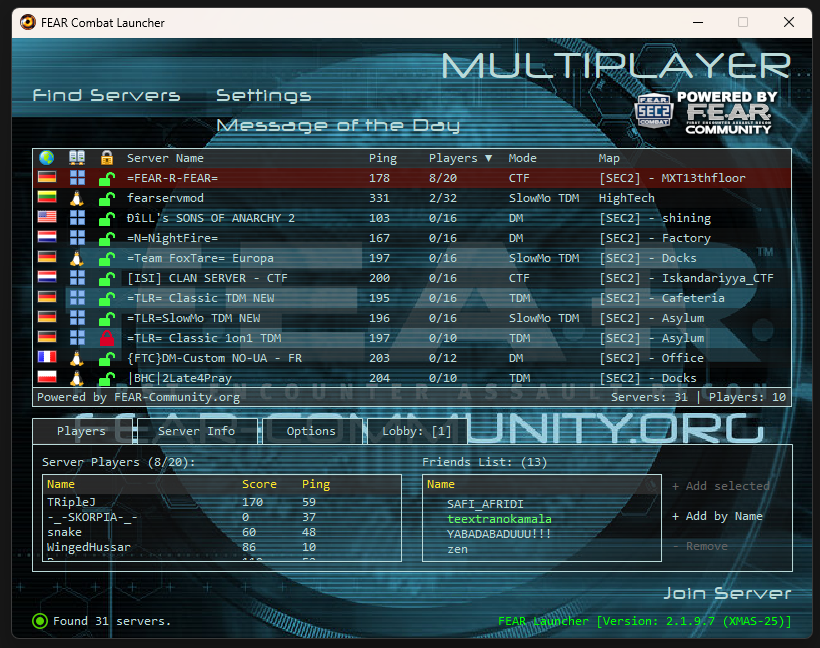
About
This is a full new Version of the FEAR Launcher!
When the original GameSpy Master server was gone, that same night we released the first Version of the FEAR Launcher:
An application that allowed you to find and join FEAR Combat Servers.
With the restoration of all the Game functionalities with the next releases of SEC2, FEAR-Community.org stopped the development of this app.
Now, we continue with It as a backup tool for the future.
This version is packed with new features:
PlayerName and CDKey verification, extended server Info, multiple server lists support, servers cache, lobby and friendlist features, and more.
Changelog
—– Version 2.2.0.0 —–
✅- NEW: Auto-Update Server List Timer (FEAR UI) – Automatically refreshes server list every N minutes (configurable).
✅- NEW: Favorite Servers – Mark servers as favorites with a Star icon for quick access.
✅- NEW: Favorite Server Notifications – Get notified when ANY player joins or leaves a favorite server.
✅- NEW: Lobby Notifications – Get notified when players join or leave the Lobby.
✅- NEW: Friend Join/Leave Toast Notifications (FEAR UI) – Native Windows 10/11 notifications when friends join or leave servers.
✅- NEW: "Do Not Disturb" Mode – Automatically suppresses notifications while the game is running (Configurable).
✅- NEW: Enhanced Notification Settings – Toggle specific alerts for Favorites and Friends.
✅- NEW: Single Instance Detection – Prevents multiple launcher instances; shows friendly dialog if app is already running.
✅- NEW: Close Button Disable – When "Minimize to system tray on close" is enabled, the X button is grayed out to indicate the app won't close.
✅- NEW: Friends Count in Player List – Details panel players header shows friend count with number in green, e.g. "Server Players (4(2)/16):".
✅- NEW: Red Background on Invalid Credentials – Background changes to red when lobby login fails due to invalid Player Name or CD Key. Reverts on successful login; ignores connection errors.
✅- NEW: AuthV Server Name Coloring – Server names use a gradient-of-trust palette based on AuthV status, game version, and mod compatibility. AuthV2=white, AuthV1=default, No AuthV=dimmed, Modded=warm-dimmed, Other Game=strongly dimmed.
✅- NEW: Missing Profile Detection – Detects when no game profile exists (fresh install) and prompts user to launch the game to create one, with "Launch Game" and "Cancel" options. Player name field is disabled until a profile is found.
✅- UI: Improved layout and alignment in Server Info panel.
✅- Improved: Settings / Game / Run full diagnostics button opens improved Diagnostics window.
✅- Improved: Diagnostics window now shows more detailed information about the system and allows sharing report.
✅- Improved: Diagnostics window now shows user-friendly "Invalid Player Name for the CD Key in use" message for 401 errors.
✅- Improved: Friend List now sorts Online friends to the top.
✅- UI: Friends List Header now displays "(Online/Total)" with color coding.
✅- UI: Online Friends are highlighted in Green.
✅- Fixed: Missing sound effect on server list click.
✅- Fixed: Minimize to system tray on close now works properly (default: Enabled).
✅- NEW: First Run Diagnostics – Automatically runs diagnostics tool on first launch to ensure system readiness.
—– Version 2.1.9.9 —–
✅- NEW: "Import from Web" feature to fetch PlayerName/CDKey from fear-community.org.
✅- NEW: Safe PlayerName Editing (Fixed profile corruption issue).
✅- Improved: Robust retry logic (5 attempts) for Web Import and Lobby Verification.
✅- UI: Added "Show Password" toggle in Login Dialog.
✅- UX: Moved Diagnostics from startup to Settings > Game tab (On-demand).
✅- Feature: Added **DirectX 9.0c Install Button** to Settings > Game (Enabled only if missing).
✅- Feature: **Smart DirectX 9 Installer**: Offers Web vs. Offline (with auto-download) options.
✅- Feature: Added **Registration Link** to FEAR Community Login Dialog.
✅- Feature: Added **FPS HID Fix Manager** in Settings > Game (Install/Uninstall dinput8.dll).
✅- Feature: Added **DirectX 9.0c Check & Installer** to Diagnostics Window.
—– Version 2.1.9.8 —–
✅- UI: Left-aligned status text in Login Dialog for better readability.
✅- UX: Smart Save/Verify buttons (Verify disabled on unsaved changes; Save disabled on no changes).
✅- UI: Server List now visually distinguishes non-SEC2 servers (Gray vs Teal).
✅- UX: Clicking Version text now always opens the Updates window.
✅- Feature: Added Retro-Style Detailed Update Report Dialog on failure (with Copy to Clipboard).
—– Version 2.1.9.7 —–
✅- Info: Version 2.1.9.7 "XMAS-25" release.
✅- Improved: Friend List now shows online status and count.
✅- Feature: "Join Server" button logic extended to join friends' servers directly.
✅- Feature: Double-click an online Friend to join their server.
✅- NEW: Details Panel Refactor (Performance/Stability).
✅- Fixed: Friends List scroll issues and "Add" button logic.
✅- Fixed: "Empty Lobby" list on startup.
✅- Fixed: Settings Window not saving Friends List changes.
✅- UI: Enhanced Details Panel visuals (Headers, Borders, Icons).
✅- Improved: Server Info now displays full Country Name (e.g., "United Kingdom").
✅- UI: "Join" button text now dynamically changes ("Join Friend", "Join Server", "Join").
✅- Fixed: Restored Friend Join sound notification.
—– Version 2.1.9.6 —–
✅- Fixed: Issue where switching from FEAR Style to Native Windows required a manual restart.
✅- Fixed: Rare crash (RuntimeError) when closing the Settings window.
✅- Stability: Improved configuration reloading logic.
✅- Fixed: Internal logic issue preventing restart in FEAR UI.
—– Version 2.1.9.5 —–
✅- NEW: Full migration of FEAR UI from Pygame to Native wxPython (Performance/Stability).
✅- NEW: Dynamic UI Theme Switching (No restart required).
✅- Changed Default Interface Style to FEAR.
✅- Added Audio Feedback (Click sounds).
✅- Settings: Cleaned up interactions (Cancel button, silent save).
✅- Lobby: Auto-logout on failure and improved connection feedback.
—– Version 2.1.9.4 —–
✅- NEW: Startup Diagnostics Window (Checks Game Path, Key, Profile, Lobby).
✅- Improved: Lobby Authentication with intelligent retry logic (Fail fast on 401/403).
✅- Improved: "Retry" button for connection failures in Diagnostics.
✅- Safety: Disabled direct Player Name editing to prevent profile corruption.
✅- Fixed: Main application process hang on exit.
✅- Fixed: Crash issues with animated icons in Diagnostics.
✅- Optimization: Removed PIL dependency (~5MB size reduction).
✅- NEW: Support for multiple player profiles selection (swappable *.gdb files).
—– Version 2.1.9.3 —–
✅- Fixed Verify PlayerName and CD-Key button in settings when Authentication fails.
✅- Implemented Lobby Heartbeat.
—– Version 2.1.9.2 —–
✅- Implemented the Keyboard navigation of server list.
✅- Fixed FEAR GUI Window Icon.
✅- Fixed FEAR GUI Window not finding servers at startup.
✅- Fixed http default url in MOTD; switching to https.
—– Version 2.1.9.1 —–
✅- Fix re-ordeding de-selects server on reload by clicking
✅- Fix cache server list including dead servers.
✅- Re-implementation of the FEAR-like interface.
—– Version 2.1.8.5 —–
✅ – Added Widget in site with players in Lobby
✅ – Fix updates
✅ – Add relevant icons to most GUI elements.
—– Version 2.1.8.2 —–
✅ – Move the config file to game directory for consistency.
✅ – Use latest SEC2 Mirror List
✅ – Use the Check for updates features
✅ – Update server on click.
✅ – Add Server Feature
✅ – Add All known Server Options
✅ – Add back PoweredBy FEAR Community logo
✅ – Disable registration of names starting with numbers.
✅ – Add page in the site about the FEAR Launcher
—– Version 2.1.5.0 —–
✅ – Most basic functionality Implemented.
—– Featrure requests —–
– Add option to enable/disable auto-login to lobby
– Improve all Windows GUI Buttons
– Option to add components (HID FIX, Maybe Mods?)
– Option to Troubleshooting? (DirectX install, other?)
– Add Fav server list

